
Think building a business website takes weeks and thousands of pounds? That’s what most small business owners assume (and it’s why so many keep putting it off)!
I know because I just put it to the test. Using AI tools alongside WordPress and Elementor, I built my entire website in only three days. No big budget, no complicated coding, no design agency needed.
In this article, I’ll walk you through the exact process I used. From planning the content with ChatGPT, to wireframing with Blot.new, to launching on WordPress. By the end, you’ll see how AI can give you a professional, customized website at a fraction of the time and cost.
The Challenge for Small Businesses
For most small businesses, websites feel like a trap. Agencies quote thousands for a basic site. DIY builders promise simplicity but often look generic and unprofessional. Add in the time sink of learning design, writing copy, and tweaking layouts, and many owners simply delay the whole project.
The result? Missed opportunities. Without a modern site, potential customers doubt your credibility, and you lose leads to competitors who look more polished online.
That’s the gap AI fills. Instead of spending weeks or draining your budget, you can now use AI tools to plan, design, and build a site that fits your brand in days (not months)!
Treat AI Like Your Own Specialist Team
Most people think of AI as a search engine or a quick answer tool. In reality, you can treat it like a team of specialists (if you know how to prompt it properly)!
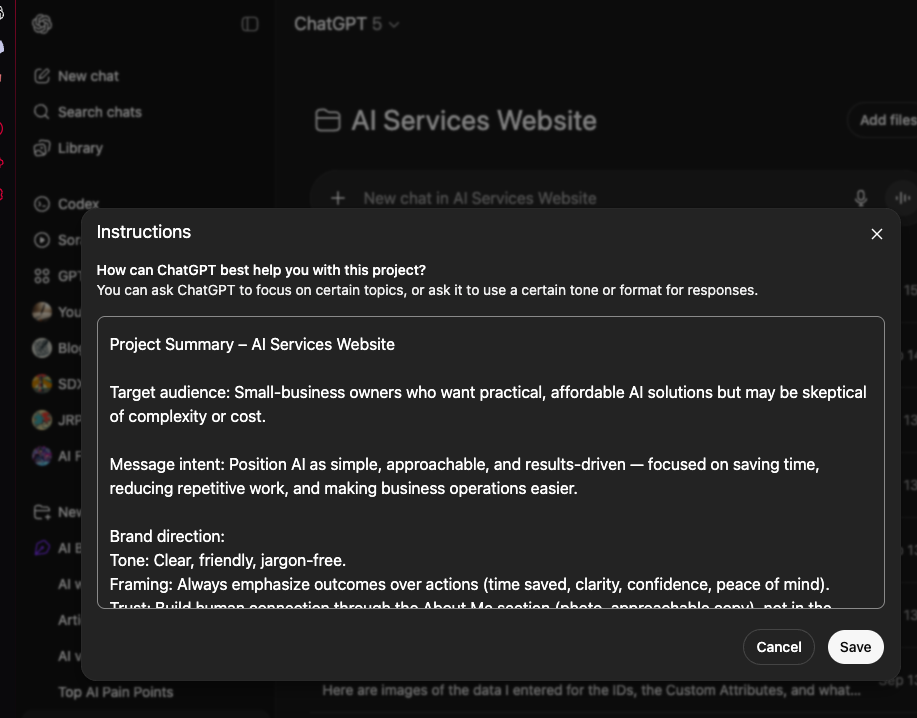
ChatGPT for example, allows you to set up what’s called “Instructions.” Think of these as a playbook that keeps the AI aligned with your goals, brand voice, and customer focus. By doing this, you’re not starting from scratch each time. You’re working with a virtual consultant who remembers your priorities and goals.
With the right prompts, AI can act like a strategist, a designer, and even a developer. You don’t need to hire three different professionals or spend half your budget. You just need clear instructions, and AI will deliver consistent ideas, layouts, and even bits of custom code when you need them.
That’s exactly how I approached my site build. I used ChatGPT to shape the messaging, Blot.new to create the visual wireframe, and WordPress with Elementor to put it all together. Here’s how it worked in practice.
Specialist 1: ChatGPT as Planner, Adviser, and Web Layout
A website is more than colors and layouts, it starts with the message. That’s where I used ChatGPT. By setting up a Project with clear “Instructions,” I trained it to focus on small-business needs: simplicity, affordability, and trust.
This meant every response I got was shaped by my goals. Instead of random ideas, ChatGPT kept refining my copy into headlines, service descriptions, and calls to action that spoke directly to small-business owners.
Once the message felt sharp and consistent, I updated the Instructions so that every stage of the process stayed aligned. In effect, ChatGPT worked like my brand strategist and copywriter, making sure the foundation of the site spoke clearly to the right audience.
Specialist 2: Blot.new as Web Designer
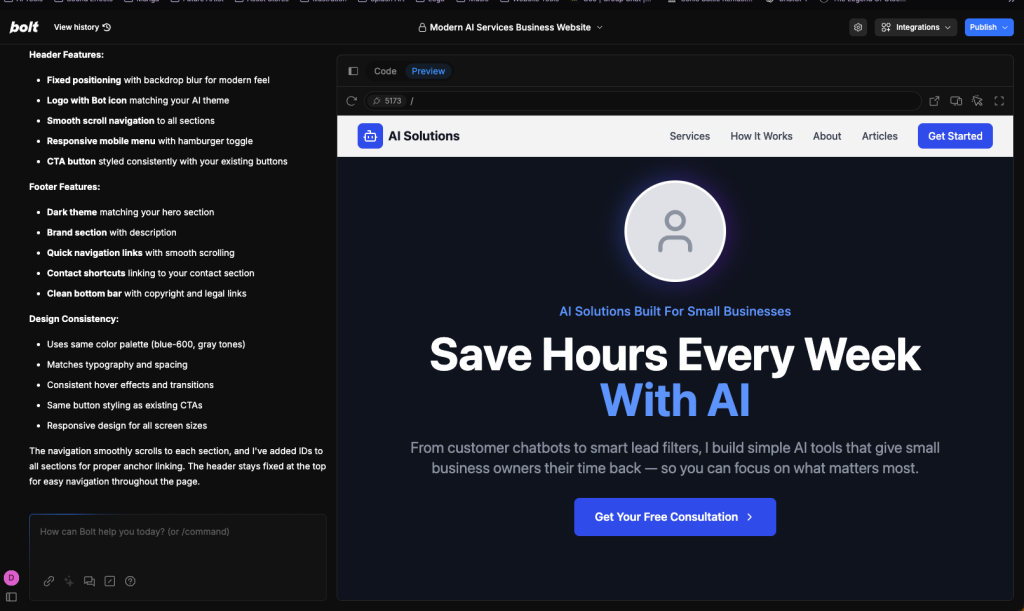
Once the message was clear, I needed to see it on a page. That’s where Blot.new helped. I took the wireframe prompt from ChatGPT and dropped it into Blot.new to get a fast visual of the site flow.
Then I ran a tight loop:
- Generate a Blot.new visual.
- Screenshot a section.
- Ask ChatGPT to review it like a strategist, designer, and UX writer.
- Apply the highest-impact fixes first.
I asked ChatGPT to think deeply about the intent of each block and to propose logical steps. This wasn’t vague feedback. It was specific and practical. A few examples:
- Headlines sharpened to speak to small-business outcomes, not features.
- CTAs rewritten and repositioned for context. For example, switching from “Book a call” to a single “Email me” and placing it where decision energy peaks.
- Profile picture moved for better eye-flow and trust. Alignment adjusted so the face leads into copy, not away from it.
- Service cards simplified for scannability. Fewer bullets. Clearer benefits.
- Spacing and hierarchy tuned so the most important message is always visible above the fold.
Each screenshot review led to quick copy changes in ChatGPT and a fresh Blot.new pass. After a few cycles the structure felt obvious and the words did the heavy lifting. With the wireframe locked, I was ready to build it fast in WordPress and Elementor.
WordPress + Elementor Build
With the layout finalized, it was time to turn the wireframe into a live site. I already had hosting space through NameHero, so I set up WordPress and installed Elementor to replicate the Blot.new design.
- NOTE: Blot.new offers hosting as well if you want an All-in-One solution. As mentioned, I happen to already have NameHero so I went with the WordPress route.
This step moved surprisingly fast. By keeping ChatGPT open, I treated it like an on-demand developer. I asked it for CSS snippets to fine-tune spacing and effects, and even had it generate small custom Elementor widgets so I could add features without paying for third-party plugins. (Yes! Custom Elementor widgets, not plugins, to that integrated into WordPress).
The core build took about half a day. Most of that time was spent dragging and dropping sections in Elementor to match the wireframe, then plugging in the polished copy ChatGPT had already written. The rest was refining details—fonts, colour balance, and mobile responsiveness.
By the end of Day 1, the entire structure of the site was live, functional, and ready for final assets.
Day 2–3: Assets and Fine-Tuning
With the framework live, the next two days were about polish. I sourced and prepared the visual elements—icons, background graphics, and my profile picture—then dropped them into the design. Each piece was reviewed against the site’s message to make sure it reinforced clarity and trust rather than clutter.
I also set up the practical parts of the site: contact and email forms, security features, and a basic blog section with a few starter posts. ChatGPT was still in the loop here. I used it to draft blog intros, tighten form copy, and check that CTAs were consistent across the site.
By the end of Day 3, the site wasn’t just technically complete—it was polished, branded, and lead-ready. Instead of weeks of delays or a hefty agency invoice, I had a professional site in front of potential clients in less than half a week.
Results
In just three days, I went from a blank canvas to a fully functioning website. The final site was professional, customised to my brand, and built without the heavy costs that usually come with web design.
The real win was the balance of speed and control. AI handled the heavy lifting—strategy, copy, structure, and even bits of code—while tools like Blot.new and Elementor gave me the flexibility to shape the design in real time. Instead of compromising on quality or waiting weeks, I launched quickly with confidence that the site spoke directly to small-business owners.
For any business owner who has been putting off a website because it feels too expensive or overwhelming, this shows what’s possible: AI can cut the time and cost dramatically, while still giving you something that looks and works like it was made by a professional team.
Takeaway
Building a website no longer needs to be expensive, complicated, or slow. By using AI like ChatGPT as your strategist and copywriter, Blot.new as your wireframe designer, and WordPress with Elementor as your builder, you can launch a professional site in days instead of months—without draining your budget.
And here’s the key: you don’t even need WordPress or Elementor if you don’t want them. Blot.new can publish and host a finished site directly. I simply chose WordPress and Elementor because I was already comfortable working in that environment. The bigger point is that you now have flexible, affordable options.
If you’re a small business owner who needs a site that looks sharp, works smoothly, and speaks directly to your customers, I can help you get there. I’ve done it myself, and I can do the same for you.
Ready to see what AI can build for your business? Get in touch today and let’s create a site that saves you time, money, and stress.


